Powered by GitBook
Published:
28 Apr, 2026
What changed when we gave our embedded AI Assistant structured inputs and custom tools

AI summary
By integrating structured inputs and custom tools into their AI Assistant, GitBook transformed the user experience from reactive chat into proactive, guided onboarding. This approach removes ambiguity and friction, allowing the AI to coordinate dynamic, personalized flows while grounding interactions in factual documentation.
When we rolled out embedded Assistant across the GitBook marketing site, the goal was simple: allow visitors to access it from anywhere on the site, so they could ask questions and access our documentation whenever they needed.
That already works well. If you know what you’re looking for, you can get answers grounded in real documentation and move quickly.
But the more interesting question came after that — what should the Assistant actually do beyond answering specific questions? Could the Assistant help someone new explore the product as well?
There was a clear opportunity here. Instead of waiting for first-time visitors to come up with a well-formed question, the Assistant can help shape that exploration — guiding users toward something concrete, while staying grounded in the docs and real product context.
From there, the focus shifts from reactive availability (”I'm here if you have questions”) to proactive usefulness (”let me guide you along”) — particularly when it comes to onboarding.
Where plain AI chat falls short
Most AI assistants are already good at answering direct questions. But broader questions like “what should I use GitBook for?” or “how much could GitBook Assistant save me on support costs?” are much harder to answer well.
And even if they do come up with a good version of that question, the output can drift — perhaps it’s too generic, too long, or just inconsistent between runs.
To solve this, I started looking for a solution that would help the Assistant behave more consistently for these kinds of questions. Ones that prospective customers perhaps haven’t fully formulated themselves, but which help them understand GitBook’s value.
Treating the Assistant as a coordinator
Instead of trying to make the Assistant better at everything, I started treating it as something that coordinates between different steps.
Sometimes that might mean asking a clarifying question, or collecting structured inputs. Other times it could mean calling a tool or searching the docs. The important part was helping Assistant to decide when to do each of those things, and how to connect them into a coherent flow.
Once that clicked, the rest of the system became much easier to reason about.
I didn’t need to design a rigid onboarding funnel, or map out every possible path a user could take. Instead, I could define a small set of capabilities and let the Assistant combine them dynamically based on the conversation.
Structured inputs, inside the conversation
The biggest practical change came from a tool we’d recently implemented in Assistant anyway.
First, I gave Assistant some specific questions to ask. But instead of relying on free-text input, I introduced structured inputs directly into the conversation — single-choice and multi-choice options that the Assistant can render when it needs more specific information.
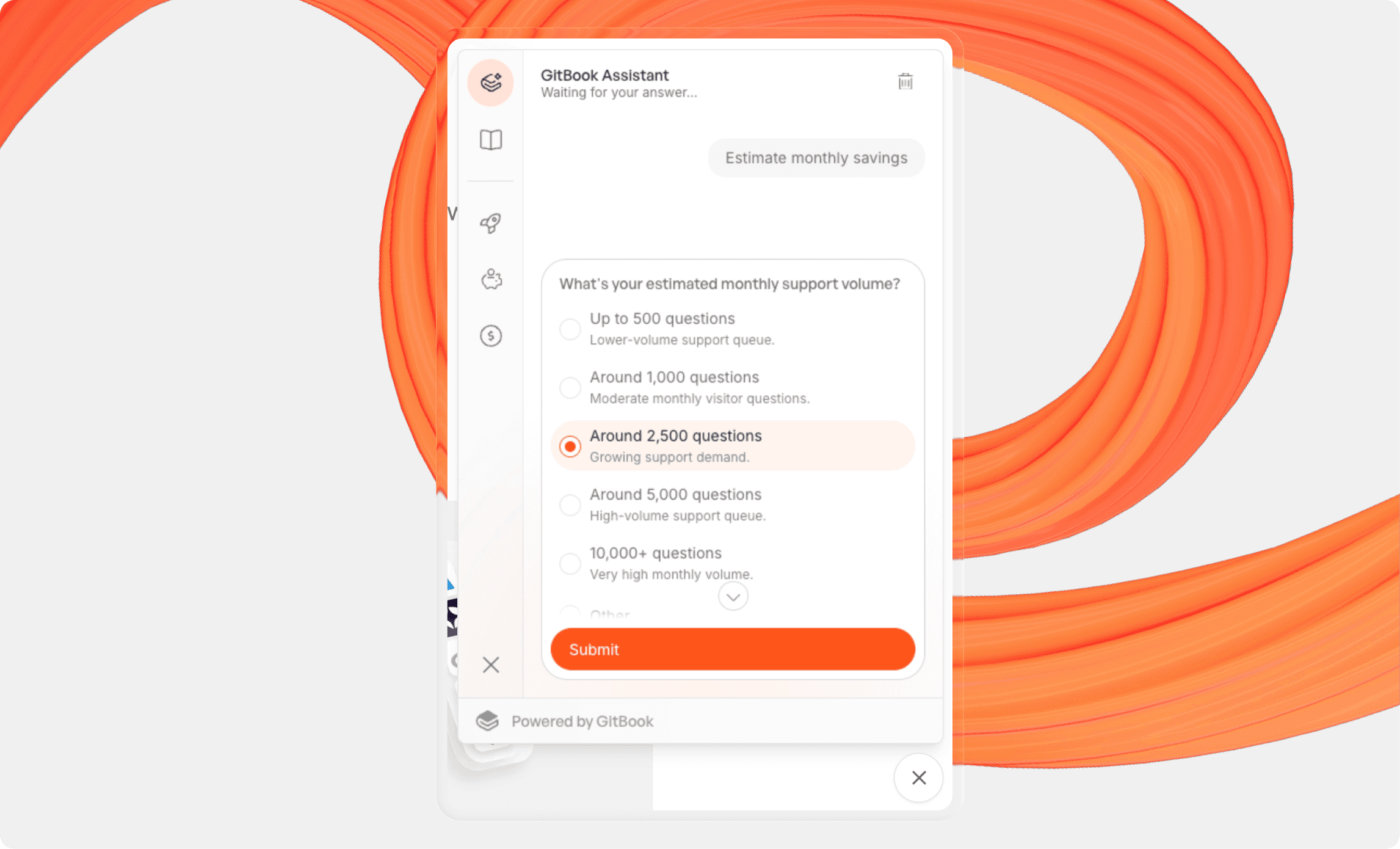
This reduces friction for the user, because they don’t have to figure out how to phrase their answer. It also improves the quality of the signal the Assistant receives, which makes everything downstream more reliable.
It feels convenient for users — but in the backend, it’s also about control.
A lot of the inconsistency in AI interactions comes from ambiguity. By introducing structured inputs at the right moments, you remove a large part of that ambiguity without breaking the conversational flow.
Getting this right did require some manual work. I taught the Assistant which questions would be useful as a single-choice input vs a multi-choice input, and how to distinguish between the two. Once that mapping was in place, the interaction started to feel much more natural.
This has other benefits too — particularly for AI insights, which help you understand what visitors are asking the Assistant. Offering structured inputs improves data richness here, making it easier for you to identify trends or group customers based on their choices.
Designing a guided flow without making it feel like a form
The first place this came together was in a simple ‘Explore GitBook’ flow.
The goal was to understand just enough about the user to point them in the right direction — without turning the interaction into a questionnaire. I ended up settling on three questions: what they’re trying to do, what their primary goal is, and what other considerations matter.
That three question constraint was important.
Any more and the experience quickly starts to feel like a form. Any fewer and you don’t get enough data to make meaningful recommendations. Finding that balance — and the right questions to ask — took a bit of iteration, and it’s one of the areas where human judgment mattered more than anything the Assistant could generate.
The Assistant’s role here is to run the flow — asking each question in sequence, waiting for input, and then moving on. The structure itself is defined separately.
Separating structure from presentation
The tool behind that flow is intentionally narrow in scope, and it doesn’t try to produce a final answer. Instead, it returns structured data — recommended features, suggested next steps, and relevant areas of the documentation to explore.
Below is a (slightly shortened) sample of the code I used for this process. It’s worth noting that, minus some math, this is all the code you need for the Assistant to have the tool at its disposal and call it independently.
window.GitBook('configure', {
    // Actions add buttons to the embed window's sidebar
    actions: [
        { icon: 'rocket', label: 'Explore GitBook with the Assistant', onClick: () => { window.GitBook('postUserMessage', 'Highlight GitBook features for my use case'); }, },
        // + Estimate savings tool...
    ],

    // Custom tools help the Assistant execute calculations and perform tasks, grounding the response in facts
    tools: [
        // Recommend features based on the user's context
        {
            name: 'recommend_knowledge_loop',
            description: `Suggest practical GitBook features and next steps.
                BEFORE you use this tool, ask the user these questions in order: What are you building? What's your main goal with your useCase? What else matters to you?
                AFTER you use this tool, execute a docs search to find documentation for the features you recommend and present the result as a compelling, well-motivated introduction to GitBook.`,
            inputSchema: {
                type: 'object',
                properties: {
                    useCase: { type: 'string', description: 'What the user is building', },
                    primaryGoal: { type: 'string', description: "The user's main goal, using the useCase answer", maxItems: 6, },
                    considerations: { type: 'array', items: { type: 'string' }, description: 'Additional considerations such as translated content, private or authenticated docs, ...', maxItems: 6, },
                },
                required: ['useCase', 'primaryGoal', 'considerations'],
            },
            execute: async (input) => {
                const recommendations = [];

                // Core layer
                add('GitBook Assistant — give users direct answers grounded in your docs and connected knowledge sources.');
                add('AI insights — understand what people ask, which answers work, and where your docs need better coverage.');

                // Use cases
                if (useCase.includes('product documentation')) {
                    add('Published docs with strong structure and navigation — make key workflows easy to discover and easy to trust.');
                    add('Docs Embed — bring answers closer to your product or site experience.');
                }

                if (useCase.includes('api documentation')) {
                    add('OpenAPI and API reference — make answers actionable with endpoints, schemas, and code examples.');
                    add('Guides and Quickstart — help developers reach a working implementation faster.');
                }

                // Etc...

                return {
                    output: { useCase: input.useCase, primaryGoal: input.primaryGoal, considerations: input.considerations || [], recommendations, },
                    summary: { icon: 'lightbulb', text: `Gathered recommendations for ${String(input.useCase?.label ?? 'your use case').toLowerCase()}`, },
                };
            },
        },
        // + Estimate savings tool...
    ],
    // + Other configuration...
});
window.GitBook('configure', {
    // Actions add buttons to the embed window's sidebar
    actions: [
        { icon: 'rocket', label: 'Explore GitBook with the Assistant', onClick: () => { window.GitBook('postUserMessage', 'Highlight GitBook features for my use case'); }, },
        // + Estimate savings tool...
    ],

    // Custom tools help the Assistant execute calculations and perform tasks, grounding the response in facts
    tools: [
        // Recommend features based on the user's context
        {
            name: 'recommend_knowledge_loop',
            description: `Suggest practical GitBook features and next steps.
                BEFORE you use this tool, ask the user these questions in order: What are you building? What's your main goal with your useCase? What else matters to you?
                AFTER you use this tool, execute a docs search to find documentation for the features you recommend and present the result as a compelling, well-motivated introduction to GitBook.`,
            inputSchema: {
                type: 'object',
                properties: {
                    useCase: { type: 'string', description: 'What the user is building', },
                    primaryGoal: { type: 'string', description: "The user's main goal, using the useCase answer", maxItems: 6, },
                    considerations: { type: 'array', items: { type: 'string' }, description: 'Additional considerations such as translated content, private or authenticated docs, ...', maxItems: 6, },
                },
                required: ['useCase', 'primaryGoal', 'considerations'],
            },
            execute: async (input) => {
                const recommendations = [];

                // Core layer
                add('GitBook Assistant — give users direct answers grounded in your docs and connected knowledge sources.');
                add('AI insights — understand what people ask, which answers work, and where your docs need better coverage.');

                // Use cases
                if (useCase.includes('product documentation')) {
                    add('Published docs with strong structure and navigation — make key workflows easy to discover and easy to trust.');
                    add('Docs Embed — bring answers closer to your product or site experience.');
                }

                if (useCase.includes('api documentation')) {
                    add('OpenAPI and API reference — make answers actionable with endpoints, schemas, and code examples.');
                    add('Guides and Quickstart — help developers reach a working implementation faster.');
                }

                // Etc...

                return {
                    output: { useCase: input.useCase, primaryGoal: input.primaryGoal, considerations: input.considerations || [], recommendations, },
                    summary: { icon: 'lightbulb', text: `Gathered recommendations for ${String(input.useCase?.label ?? 'your use case').toLowerCase()}`, },
                };
            },
        },
        // + Estimate savings tool...
    ],
    // + Other configuration...
});
window.GitBook('configure', {
    // Actions add buttons to the embed window's sidebar
    actions: [
        { icon: 'rocket', label: 'Explore GitBook with the Assistant', onClick: () => { window.GitBook('postUserMessage', 'Highlight GitBook features for my use case'); }, },
        // + Estimate savings tool...
    ],

    // Custom tools help the Assistant execute calculations and perform tasks, grounding the response in facts
    tools: [
        // Recommend features based on the user's context
        {
            name: 'recommend_knowledge_loop',
            description: `Suggest practical GitBook features and next steps.
                BEFORE you use this tool, ask the user these questions in order: What are you building? What's your main goal with your useCase? What else matters to you?
                AFTER you use this tool, execute a docs search to find documentation for the features you recommend and present the result as a compelling, well-motivated introduction to GitBook.`,
            inputSchema: {
                type: 'object',
                properties: {
                    useCase: { type: 'string', description: 'What the user is building', },
                    primaryGoal: { type: 'string', description: "The user's main goal, using the useCase answer", maxItems: 6, },
                    considerations: { type: 'array', items: { type: 'string' }, description: 'Additional considerations such as translated content, private or authenticated docs, ...', maxItems: 6, },
                },
                required: ['useCase', 'primaryGoal', 'considerations'],
            },
            execute: async (input) => {
                const recommendations = [];

                // Core layer
                add('GitBook Assistant — give users direct answers grounded in your docs and connected knowledge sources.');
                add('AI insights — understand what people ask, which answers work, and where your docs need better coverage.');

                // Use cases
                if (useCase.includes('product documentation')) {
                    add('Published docs with strong structure and navigation — make key workflows easy to discover and easy to trust.');
                    add('Docs Embed — bring answers closer to your product or site experience.');
                }

                if (useCase.includes('api documentation')) {
                    add('OpenAPI and API reference — make answers actionable with endpoints, schemas, and code examples.');
                    add('Guides and Quickstart — help developers reach a working implementation faster.');
                }

                // Etc...

                return {
                    output: { useCase: input.useCase, primaryGoal: input.primaryGoal, considerations: input.considerations || [], recommendations, },
                    summary: { icon: 'lightbulb', text: `Gathered recommendations for ${String(input.useCase?.label ?? 'your use case').toLowerCase()}`, },
                };
            },
        },
        // + Estimate savings tool...
    ],
    // + Other configuration...
});
window.GitBook('configure', {
    // Actions add buttons to the embed window's sidebar
    actions: [
        { icon: 'rocket', label: 'Explore GitBook with the Assistant', onClick: () => { window.GitBook('postUserMessage', 'Highlight GitBook features for my use case'); }, },
        // + Estimate savings tool...
    ],

    // Custom tools help the Assistant execute calculations and perform tasks, grounding the response in facts
    tools: [
        // Recommend features based on the user's context
        {
            name: 'recommend_knowledge_loop',
            description: `Suggest practical GitBook features and next steps.
                BEFORE you use this tool, ask the user these questions in order: What are you building? What's your main goal with your useCase? What else matters to you?
                AFTER you use this tool, execute a docs search to find documentation for the features you recommend and present the result as a compelling, well-motivated introduction to GitBook.`,
            inputSchema: {
                type: 'object',
                properties: {
                    useCase: { type: 'string', description: 'What the user is building', },
                    primaryGoal: { type: 'string', description: "The user's main goal, using the useCase answer", maxItems: 6, },
                    considerations: { type: 'array', items: { type: 'string' }, description: 'Additional considerations such as translated content, private or authenticated docs, ...', maxItems: 6, },
                },
                required: ['useCase', 'primaryGoal', 'considerations'],
            },
            execute: async (input) => {
                const recommendations = [];

                // Core layer
                add('GitBook Assistant — give users direct answers grounded in your docs and connected knowledge sources.');
                add('AI insights — understand what people ask, which answers work, and where your docs need better coverage.');

                // Use cases
                if (useCase.includes('product documentation')) {
                    add('Published docs with strong structure and navigation — make key workflows easy to discover and easy to trust.');
                    add('Docs Embed — bring answers closer to your product or site experience.');
                }

                if (useCase.includes('api documentation')) {
                    add('OpenAPI and API reference — make answers actionable with endpoints, schemas, and code examples.');
                    add('Guides and Quickstart — help developers reach a working implementation faster.');
                }

                // Etc...

                return {
                    output: { useCase: input.useCase, primaryGoal: input.primaryGoal, considerations: input.considerations || [], recommendations, },
                    summary: { icon: 'lightbulb', text: `Gathered recommendations for ${String(input.useCase?.label ?? 'your use case').toLowerCase()}`, },
                };
            },
        },
        // + Estimate savings tool...
    ],
    // + Other configuration...
});
From there, the Assistant takes over again, using the output to search the docs, pull in context, and present something that feels tailored to the user.
That separation is important. Keeping the tool focused on structure makes it predictable and easy to reason about. Meanwhile, letting the Assistant handle interpretation keeps the experience flexible and conversational. And the user gets the best of both worlds.
The huge impact of giving AI assistants new tools
The same pattern shows up even more clearly in the savings estimator I built next. This second tool prompts you to give an estimated support ticket volume and returns an estimated figure the Assistant could save you by handling those customer questions instead.
This is exactly the kind of task where you want deterministic behavior; the calculation itself is straightforward, but it needs to produce the same result for the same input every time. That’s not something you want to leave to AI.
But beyond that, asking users to type in precise numbers about their internal operations can feel intrusive and off-putting — especially so early in an interaction.
Instead, I researched and defined a set of realistic support-volume ranges, based on common scenarios, and let users pick from those. There’s still an ‘Other’ option for flexibility, but most people shouldn’t need it.
This small change — picking a ballpark figure instead of finding and then typing your team’s specific number — makes the interaction feel lighter, while still providing enough information for the tool to work with.
The tool then uses a fixed calculation with stated assumptions to provide a realistic result, which is exactly the kind of thing that benefits from a tool instead of pure prompting.
Again, the pattern holds: structured input to gather data, a tool to handle the logic, and the Assistant to present the result.
What this unlocks
The most interesting part of this work isn’t the specific tools or flows — it’s what happens when you combine them.
If you give the Assistant access to structured inputs and a small set of tools, it can start to build interactions dynamically. And you don’t have to define every possible path in advance. The Assistant can guide users based on what they say, while still relying on structured components where it matters.
That creates a useful middle ground — more flexible and personalized than a predefined onboarding flow, but more reliable than basic chat.
The takeaway
In the end, the biggest improvement didn’t come from making the Assistant ask people a bunch more questions — it came from giving it better ways to ask them.
Once the Assistant could collect structured inputs, call tools when they’re needed, and still ground all the answers in real documentation, the interaction becomes fundamentally better.
It quickly stops feeling like a generic chatbot or pre-set form, and instead feels more like an expert that can guide you towards a useful, meaningful outcome.
I’m really happy with the results — and you can test them out for yourselves by opening the Assistant from the bottom-right corner of this page, just down there ↘️
→ skill.md explained: How to structure your product for AI agents
→ If your support team knows the answer, your docs should too
Share



Read more
Powered by GitBook
Get the GitBook newsletter
Get the latest product news, useful resources and more in your inbox. 130k+ people read it every month.





Accurate docs. Better answers.
Your docs are already feeding AI. Are users getting the right answers or the wrong ones?
Accurate docs. Better answers.
Your docs are already feeding AI. Are users getting the right answers or the wrong ones?
Accurate docs. Better answers.
Your docs are already feeding AI. Are users getting the right answers or the wrong ones?
Product
Create & Publish
Solutions
Resources

© 2026 Copyright GitBook INC.
440 N Barranca Ave #7171, Covina, CA 91723, USA. EIN: 320502699
Get an AI summary




The State of Docs Report 2026
State of Docs brings together insights from documentation experts from across the industry
Product
Create & Publish
Solutions
Resources
© 2026 Copyright GitBook INC.
440 N Barranca Ave #7171, Covina, CA 91723, USA. EIN: 320502699
Get an AI summary
The State of Docs Report 2026
State of Docs brings together insights from documentation experts from across the industry

Product
Create & Publish
Solutions
Resources
© 2026 Copyright GitBook INC.
440 N Barranca Ave #7171, Covina, CA 91723, USA. EIN: 320502699
Get an AI summary
The State of Docs Report 2026
State of Docs brings together insights from documentation experts from across the industry